
05 · HTTP/2, HTTP/3, and 0-RTT
Understand the protocol boundary between visitors, Cloudflare, and the origin, enable HTTP/3 safely, and decide whether 0-RTT fits the application.
Edited and verified by Orange Book Editorial Team ·
Start with the boundary
HTTP/3 and 0-RTT settings apply to the visitor-to-Cloudflare connection. They do not mean Cloudflare uses HTTP/3 to the origin. A browser can use HTTP/3 to the edge while the edge uses a supported HTTP/1.1 or HTTP/2 connection to the origin.
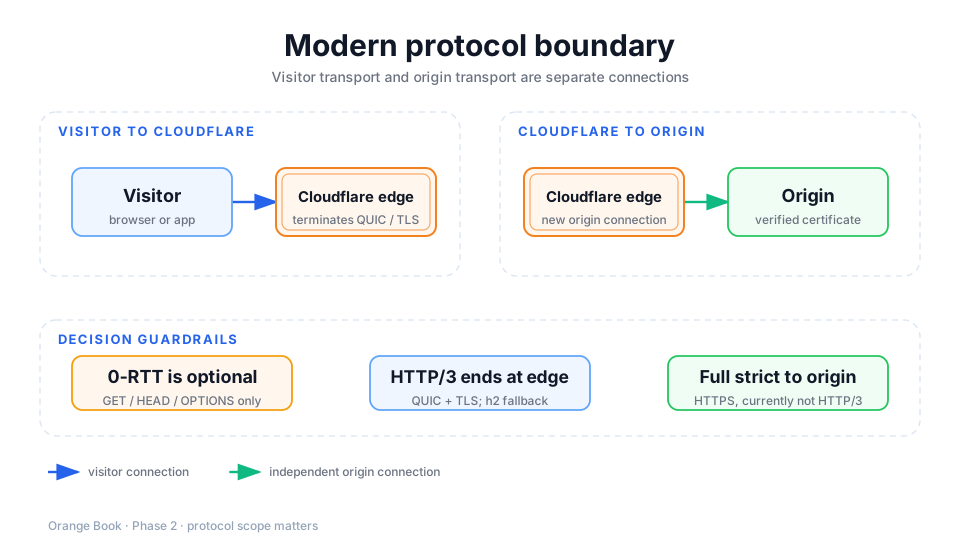
Detailed description
- 01Visitor
Negotiates HTTP/2 or HTTP/3 according to browser, operating system, and network support.
- 02Cloudflare edge
Terminates the visitor connection and applies TLS, cache, and security policy.
- 030-RTT
Only affects a returning client's resumed connection and carries a replay-risk boundary.
- 04Origin
Accepts a separate HTTPS connection whose certificate is checked by Full strict.
Compare the capabilities
| Capability | Transport | Main benefit | First evaluation |
|---|---|---|---|
| HTTP/2 | TCP + TLS | Multiplexing, header compression, broad compatibility | Keep it as the reliable fallback |
| HTTP/3 | QUIC over UDP + TLS | Reduces cross-stream blocking on lossy networks | Measure on real mobile and long-distance networks |
| 0-RTT | Resumed TLS session | Lets returning clients send limited requests earlier | Audit whether every GET/HEAD/OPTIONS endpoint is truly side-effect free |
HTTP/3 is not guaranteed to make every request faster. The first connection, UDP availability, client implementation, resource graph, and origin time all affect the result. Let it coexist with HTTP/2 so the client can negotiate rather than removing a reliable fallback for the sake of a protocol label.
Enable HTTP/3
Confirm edge HTTPS
HTTP/3 depends on an edge certificate. Confirm that pages and static assets load through Cloudflare over HTTPS, and save an HTTP/2 waterfall as the baseline.
Enable HTTP/3
Under Speed → Optimization → Protocol Optimization, enable HTTP/3 (with QUIC). It is currently available on all plans. After propagation, visit a test hostname with an HTTP/3-capable browser.
Observe negotiation in the browser
Expose the Protocol column in the developer-tools Network table and reload. h3 means the request used HTTP/3; h2 means it fell back to HTTP/2. One h2 result is not proof of a configuration failure: browser state, UDP network policy, and connection reuse can all affect negotiation.
Cross-check with a capable command-line client
curl --version
curl --http3 -sS -I https://www.example.com/
The second command is meaningful only when curl --version lists HTTP/3 support. Otherwise, use the browser or a test environment with known QUIC support instead of misdiagnosing a client limitation as a Cloudflare failure.
Treat 0-RTT as a separate security decision
0-RTT is off by default. It lets a client that connected previously send data earlier while resuming a session, but early data has a protocol-level replay risk. Cloudflare currently accepts only GET, HEAD, and OPTIONS as early requests, not POST. That does not make every GET safe.
GET can still cause writes
If the application puts deletion, sending, payment, token redemption, or one-time download behind GET, fix the endpoint semantics first. Do not rely on Cloudflare's method filter to hide the problem. The origin can use Early-Data: 1 to identify early data and reject a sensitive operation or require a retry after a normal handshake.
| Reasonable first experiments | Exclude first |
|---|---|
| Public static assets and stateless public GET requests | Sign-in redirects, one-time tokens, signed downloads |
| Repeatable read APIs with no billing side effects | Legacy endpoints where GET performs a write |
| Test hosts with replay tests and observable logs | Critical traffic where Early-Data cannot be observed |
Verification is more than seeing h3
- Compare multiple HTTP/2 and HTTP/3 samples in the same region; do not use a single fastest run.
- Record DNS, connection, TLS, TTFB, download, and origin-response timing together.
- Test on Wi-Fi, mobile, and a network that restricts UDP to prove fallback behavior.
- If you enable 0-RTT, confirm that the origin receives
Early-Dataand replay a request to prove there is no duplicate side effect. - On a problem, turn off 0-RTT first. HTTP/3 and 0-RTT are separate settings and should not be rolled back together.
Next, learn Cloudflare's default cache behavior before creating custom rules.
Primary sources
Did this page help you complete your goal?
Beta feedback is generated in this browser and is never uploaded automatically.
04 · Build an HTTPS and TLS 1.3 security baseline
After Full strict is stable, configure HTTPS redirects, minimum TLS, TLS 1.3, and HSTS in an order that preserves compatibility and rollback options.
06 · Understand Cloudflare's default cache behavior
Use request eligibility, file extensions, response headers, default TTLs, and CF-Cache-Status to explain why an object hits or bypasses cache.