
08 · Edge TTL, Browser TTL, and cache response headers
Separate browser, Cloudflare edge, and origin cache lifetimes, then use Cache-Control and CDN-Cache-Control to build an updateable release policy.
Edited and verified by Orange Book Editorial Team ·
Outcome
Browsers will not hold mutable URLs for an unsafe period, Cloudflare can retain public objects longer than browsers, fingerprinted resources can use long lifetimes safely, and private responses explicitly forbid shared storage. Releases will have a clear choice between a new URL, revalidation, and targeted purge.
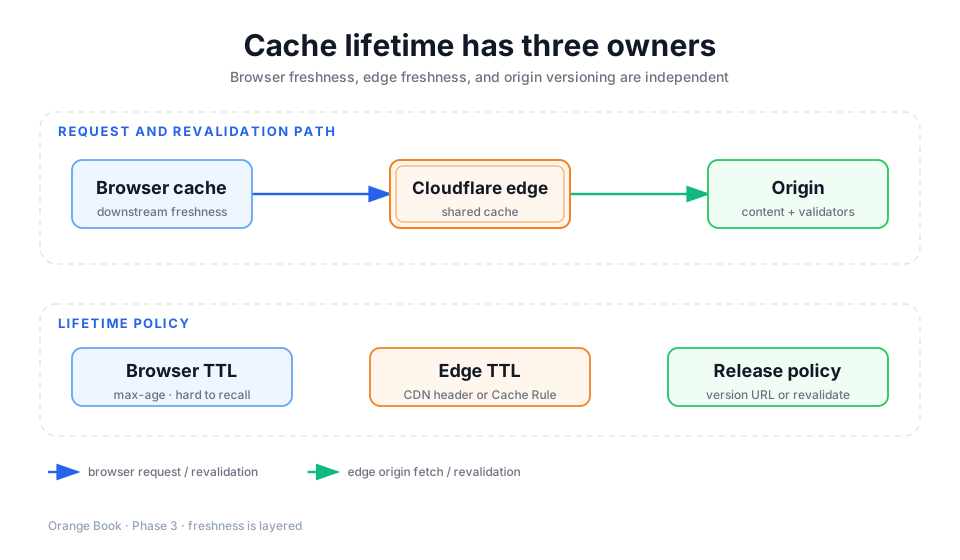
Detailed description
- 01Browser
Uses downstream Cache-Control and Browser TTL to decide whether to send a network request.
- 02Cloudflare edge
Uses Edge TTL and revalidation policy to choose HIT, UPDATING, or an origin request.
- 03Origin
Generates content and returns cache semantics, ETag, or Last-Modified.
- 04Release system
Changes URLs for immutable assets and targets mutable content with short TTLs or purges.
Do not mix the three lifetime layers
| Layer | Primary control | Suitable policy | Hardest mistake to roll back |
|---|---|---|---|
| Browser | Cache-Control: max-age, Browser TTL | Conservative for mutable URLs; long for fingerprinted URLs | One year on unversioned HTML or JS |
| Cloudflare edge | Edge TTL, shared-cache headers, Cache Rules | Public content can outlive the browser copy | Forcing private or frequently changing responses |
| Origin/application | Response headers, ETag, Last-Modified, version URLs | Keep content semantics as the source of truth | Failing to distinguish public, private, and immutable |
When a browser still considers an object fresh, it sends no request to Cloudflare. A later edge purge cannot prevent that user from seeing the local copy. Avoid hard-to-revoke Browser TTLs on unversioned pages and scripts.
Divide responsibilities across headers
| Header or directive | Primary consumer | Purpose |
|---|---|---|
Cache-Control: max-age=... | Browsers and caches not separated by a dedicated header | Client freshness |
s-maxage=... | Shared caches | Overrides max-age in shared cache; browsers ignore it |
Cloudflare-CDN-Cache-Control | Cloudflare | Dedicated Cloudflare edge policy |
CDN-Cache-Control | CDNs that support the field | Generic CDN policy separate from browsers |
| Edge TTL Cache Rule | Cloudflare | Overrides edge-lifetime headers for matching requests |
| Browser TTL Cache Rule | Downstream response | Overrides Cache-Control behavior sent to browsers |
Do not combine s-maxage and stale-while-revalidate casually
In Cloudflare's current behavior, s-maxage implies proxy-revalidate and prevents a shared cache from serving stale content. If you need a separate edge lifetime while retaining asynchronous stale-while-revalidate, Cloudflare recommends origin max-age plus stale-while-revalidate, with Cache Rule Edge TTL setting Cloudflare freshness separately.
Three reviewable templates
Fingerprinted static asset
Cache-Control: public, max-age=31536000, immutableUse only for JS, CSS, fonts, and images whose URL contains a content hash and changes whenever the bytes change. Do not copy it to mutable URLs such as /app.js or /latest.pdf.
Updateable public HTML or API
Cache-Control: public, max-age=60
Cloudflare-CDN-Cache-Control: public, max-age=300, stale-while-revalidate=30
ETag: "content-version-42"
The browser asks again after one minute while Cloudflare can retain the object for five minutes and refresh asynchronously within the allowed window. These numbers are conservative examples, not universal defaults; tune them to update frequency, stale-content cost, and origin capacity.
Private page or job result
Cache-Control: private, no-storeUse for accounts, billing, administration, private image/PDF results, and permissioned data. A very short TTL does not make private shared caching safe.
Choose an Edge TTL mode in Cache Rules
| Mode | Behavior | Suitable use |
|---|---|---|
| Respect headers; bypass when absent | A response without cache headers is not stored | Governed applications where safety comes first |
| Respect headers; use Cloudflare defaults when absent | Keeps default static-extension behavior | Conventional static-site migration |
| Ignore headers and use rule TTL | Forces the selected lifetime | Narrow, proven-public objects only |
The last mode overrides the origin's freshness and potentially privacy intent. If you use it, exclude Set-Cookie, identity routes, and private APIs and validate with two accounts.
Verify TTL and revalidation
curl -sS -D first.headers -o /dev/null https://www.example.com/assets/app.abc123.js
curl -sS -D second.headers -o /dev/null https://www.example.com/assets/app.abc123.js
Inspect Cache-Control, Cloudflare-CDN-Cache-Control, Age, CF-Cache-Status, ETag, and Last-Modified. Age grows on hits and resets after revalidation, purge, or eviction. With stale-while-revalidate, a request after expiry can show UPDATING; that is the expected asynchronous-refresh state.
Next, apply these layers to CMS, SaaS, and AI-built applications.
Primary sources
Did this page help you complete your goal?
Beta feedback is generated in this browser and is never uploaded automatically.
07 · Configure Cache Rules with an allowlist mindset
Identify identity and write paths first, then admit only known public resources to cache and verify correctness with rule order, Trace, and two clients.
09 · Cache patterns for CMS, SaaS, and AI-built applications
Partition CMS, SaaS, image, and PDF tools by visibility, identity, method, and lifecycle so dynamic pages from AI-generated code never enter cache accidentally.