
01 · Safely onboard an existing domain to Cloudflare
Review DNS, change authoritative nameservers, handle DNSSEC, and verify that the domain safely reaches Cloudflare.
Edited and verified by Orange Book Editorial Team ·
Outcome
Cloudflare answers authoritative DNS for the domain, web and mail records remain correct, web hostnames begin using the proxy, and you retain repeatable before-and-after evidence.
Understand what the migration changes
Changing nameservers does not move the website to Cloudflare. The origin still generates content. You are changing who answers DNS and which HTTP/HTTPS requests reach Cloudflare first.
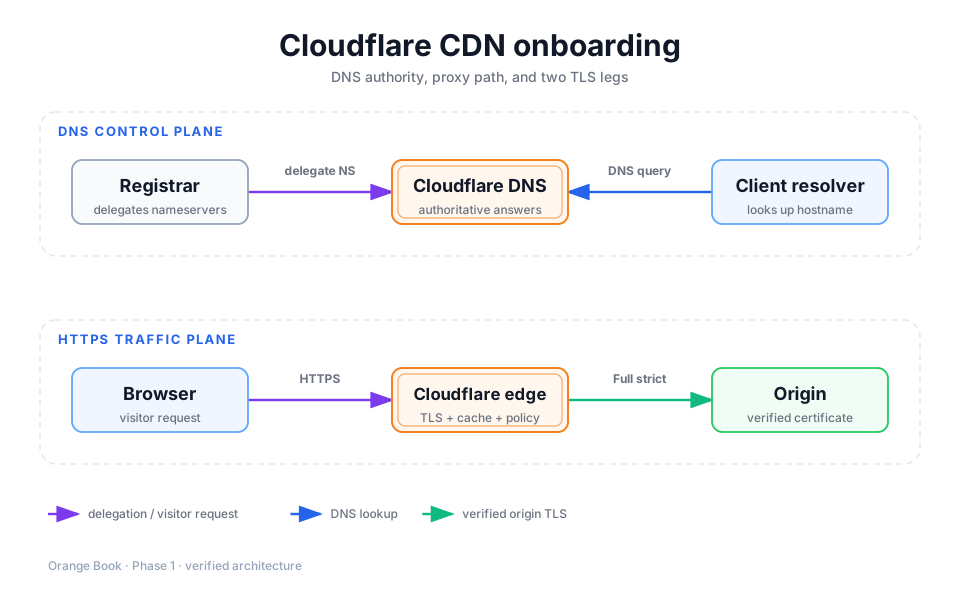
Detailed description
- 01Registrar
Stores the two authoritative nameservers assigned by Cloudflare.
- 02Cloudflare DNS
Answers with records that you reviewed.
- 03Client resolver
Looks up a hostname and receives a proxy or origin address.
- 04Cloudflare edge
Proxied web traffic enters caching and security policy here.
- 05Origin
Still generates dynamic content and accepts HTTPS origin requests.
Pre-cutover inventory
| Object | Retain at minimum | Typical failure if omitted |
|---|---|---|
Apex and www | Correct A, AAAA, or CNAME target | Site is unreachable or points to the old environment |
| MX, SPF, DKIM, DMARC, and mail-host records | Delivery, sending, or reputation problems | |
| Third-party validation | TXT and validation CNAME records | SaaS, certificate, or search verification fails |
| Subdomains | API, admin, webhook, download, and preview hosts | One business entry point disappears |
| DNSSEC | Current registrar DS state and migration procedure | The entire domain stops resolving after the NS change |
Do not trust the automatic scan alone
Cloudflare's quick scan is not guaranteed to find every record. Export the old DNS zone and compare it line by line, especially mail and validation records.
Onboard in order
Add the apex domain
In the Dashboard, open Domains → Onboard a domain, enter example.com rather than www.example.com, and choose a plan.
Review DNS records
Confirm every business record before choosing proxy status. A, AAAA, and CNAME records serving websites are usually Proxied. Mail, domain validation, and services outside the HTTP proxy remain DNS only. The next chapter provides a decision tree.
Handle DNSSEC
A normal migration disables the previous DNSSEC configuration at the registrar before changing nameservers. Otherwise, the old DS and new signatures can disagree and make the domain unresolvable. Skip this only when deliberately implementing the advanced multi-signer migration.
Prove the origin still works
Save a read-only health check before cutover and confirm that the origin responds to the correct Host over HTTPS. With a publicly trusted origin certificate, a trusted environment can run:
curl -I --resolve www.example.com:443:203.0.113.10 https://www.example.com/Replace the example IP with the origin. Never place secrets, session cookies, or administration requests in a shared migration record.
Change nameservers at the registrar
Remove the previous nameservers and enter exactly the two values assigned by Cloudflare. Do not add a third value and do not create them as ordinary NS records in the old DNS panel.
Review after the zone is Active
dig NS example.com +short
dig A www.example.com +short
curl -sS -D - -o /dev/null https://www.example.com/
Nameservers should point to Cloudflare. A proxied web hostname usually returns Cloudflare addresses, and the HTTP response should expose a cf-ray for tracing. Then enable DNSSEC in Cloudflare and store the new DS values at the registrar as instructed.
Release gate and rollback
- Review apex,
www, API, mail, and validation records independently at least twice. - Test the homepage, one dynamic page, the sign-in entry, and records required for email.
- Wait for the Cloudflare zone to become Active before enabling rules that require proxying.
- For broad NXDOMAIN failures, inspect nameservers and DNSSEC first. For one failed service, inspect that record instead of repeatedly switching all nameservers.
- Retain the old zone export and cutover time. Before a nameserver rollback, prove that the previous zone and its DNSSEC state are still valid.
Continue with DNS and proxy-status decisions.
Primary sources
Did this page help you complete your goal?
Beta feedback is generated in this browser and is never uploaded automatically.
CDN and web performance learning path
Learn Cloudflare CDN from domain onboarding through caching, HTTP/3, origin protection, and performance diagnostics.
02 · Decide between Proxied and DNS only
Decide when A, AAAA, and CNAME records should use the orange cloud and when mail, validation, or non-HTTP services must remain DNS only.