
Deploy an AI-built Next.js application to Cloudflare Workers
Put compatibility ahead of migration, then choose among static output, vinext, OpenNext, and retaining the current host with a rollback path.
Edited and verified by Orange Book Editorial Team ·
Conclusion first
An AI can make a Next.js project run locally; it cannot automatically prove compatibility with the target runtime. Evaluate static delivery for a purely static app. For SSR, Route Handlers, or Server Actions, Cloudflare currently recommends vinext by default, but it remains beta: run vinext check and repeat real tests first. Existing complex applications can continue to evaluate OpenNext or remain on their current host.
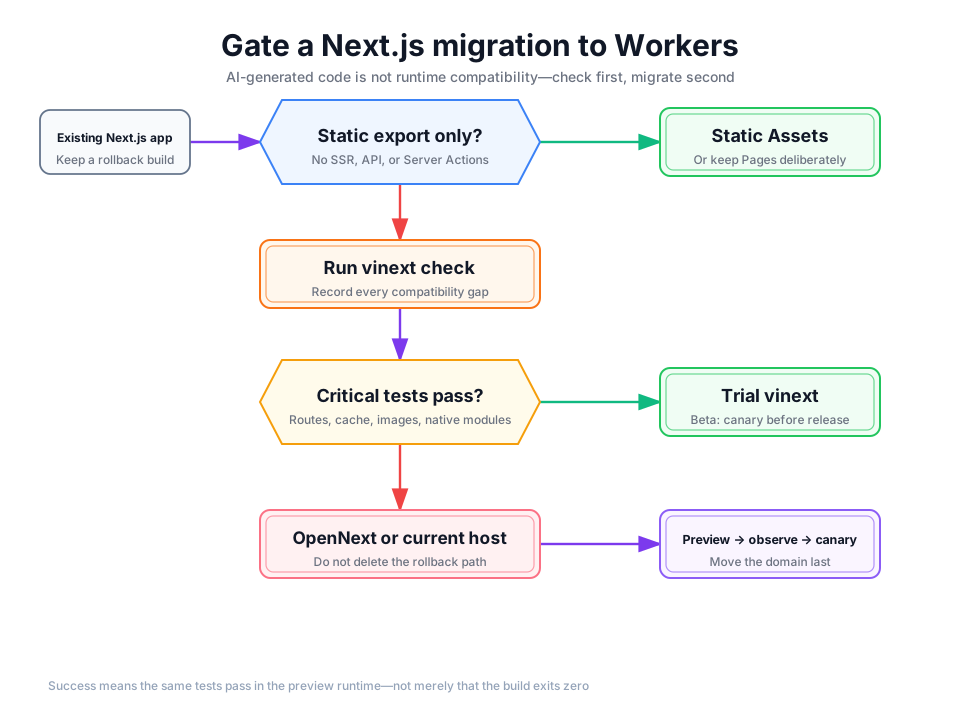
Detailed description
- 01Classify
List static pages, SSR, APIs, Server Actions, and background work.
- 02Check
Run vinext check and record rather than hide every gap.
- 03Prove
Replay critical tests in the target preview runtime.
- 04Release
Keep the old version and move the domain only after a canary.
Choose the runtime model first
| Actual application use | First candidate | Why |
|---|---|---|
| Static export only; no SSR, API, or Server Actions | Workers Static Assets, or deliberately retain Pages | The smallest runtime surface; the build output can be served directly |
| Common Next.js 16 APIs and continued Next API use | vinext compatibility gate | Cloudflare's current default recommendation; initialization coexists with existing Next scripts |
| Already stable on OpenNext, or vinext has a critical gap | OpenNext or current platform | Do not remove a proven path merely to migrate; decide by business benefit |
| Native modules, unusual build plugins, long-lived processes, or host-specific services | Keep the current host while decomposing dependencies | A successful build does not prove equivalent runtime and operations |
Compatibility gate before release
Preserve a rollback baseline
Record the current commit or archive, Node and package-manager versions, environment-variable names, build command, production URL, and critical tests. Do not ask an AI to migrate hosting, upgrade Next.js, replace the database, and rewrite authentication in one change.
Inventory the Next.js features actually in use
Inspect app/, pages/, Route Handlers, Server Actions, middleware/proxy, next/image, cache and revalidate behavior, Node native modules, filesystem calls, background work, and host-specific SDKs. Map each feature to a repeatable test.
Run the read-only compatibility check
pnpx vinext checkSave the full output. If a critical feature is unknown or partially supported, build a minimal reproduction first. Do not let an AI “pass” the check by deleting behavior, adding type assertions, or silently falling back.
Initialize vinext alongside Next.js
Only initialize after reviewing the risks. The official flow is non-destructive: the existing next dev path can continue to work.
pnpx vinext init
pnpm run dev:vinext
pnpm run build:vinext
Initialization installs dependencies and creates Vite and Workers configuration. Review file changes, scripts, compatibility date, bindings, and secret names. Never copy .env values into public configuration.
Repeat tests in the target preview runtime
At minimum test the home page and 404, dynamic routes, sign-in and sign-out, protected pages, Route Handlers, Server Actions, images, cache invalidation, uploads, database access, error pages, and mobile layout. AI-built SaaS, CMS, image, and PDF utilities also need tenant isolation, file limits, and asynchronous-job status tests.
Deploy and canary only after human approval
pnpx @vinext/cloudflare deployStart with the preview URL. Observe errors, latency, caching, and business metrics before moving traffic. Move the domain last. If a critical regression remains, using OpenNext or the existing host is a valid result—not a failed migration.
vinext is still beta
Cloudflare presents it as the current default Next.js path, while still requiring production applications to run compatibility checks. Image optimization is partially supported, and next/* modules should be checked against the compatibility dashboard. “Recommended” does not mean every Next.js project migrates without change.
Release gate
| Dimension | Pass condition | Rollback trigger |
|---|---|---|
| Functionality | The same critical tests pass on the old environment and Workers preview | Authentication, writes, uploads, or a critical route fails |
| Data | Preview uses explicit test resources; production bindings receive human confirmation | Production is touched accidentally, schemas differ, or access crosses a tenant |
| Performance | Critical-path latency and error rate stay within budget | Tail latency or CPU/memory behavior is abnormal |
| Operations | Logs, alerts, version identification, and rollback owner are ready | The team cannot identify a version or return to the old entry point |
For the platform-level model, read Workers and Pages compared with Vercel, Railway, and Render. For application responsibilities, see the full application baseline.
Primary sources
Did this page help you complete your goal?
Beta feedback is generated in this browser and is never uploaded automatically.
Foundation layers for a complete Cloudflare application
Put static assets, request logic, structured data, object storage, and background work at the right boundaries.
Workers Runtime versus Node.js
Decide whether code will run on Workers by checking Web APIs, compatibility dates, and Node compatibility.