
Troubleshoot Cloudflare 520–526 errors
Capture code, time, URL, and CF-RAY first, then locate 520 through 526 across network, TLS, and origin-response stages.
Edited and verified by Orange Book Editorial Team ·
Do not randomly change DNS, SSL, and firewall settings
Similar 5xx pages can represent different connection stages. Capture the code, time with timezone, full URL, CF-RAY, and frequency first. Then compare the request through Cloudflare with a direct-to-origin request.
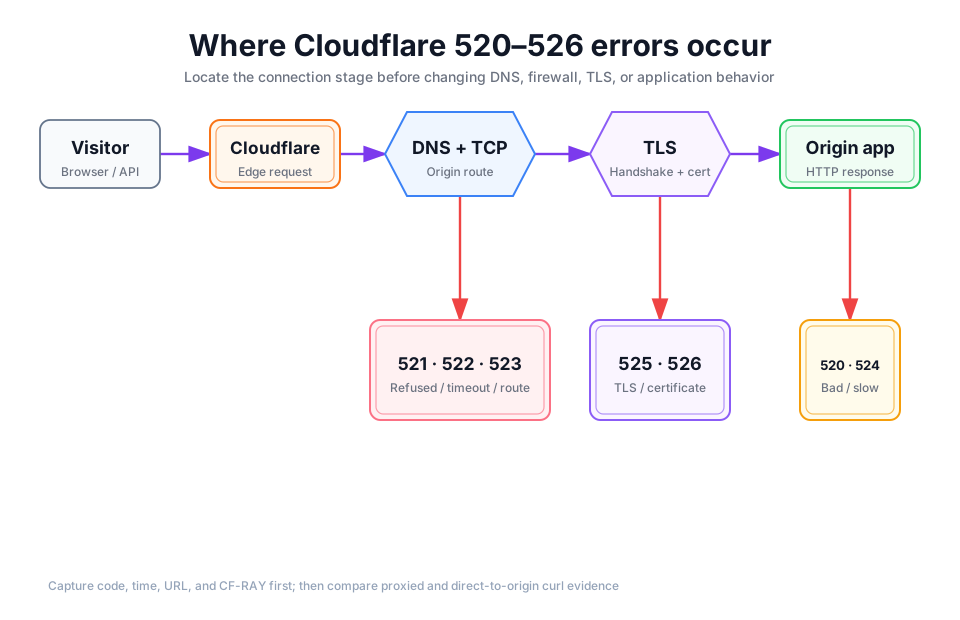
Detailed description
- 01Capture
Preserve code, time, URL, and CF-RAY.
- 02Compare
Compare proxied and Host/SNI-preserving direct-origin requests.
- 03Locate
Narrow the failure to network, TLS, or HTTP response.
- 04Change
Change one evidenced cause at a time and retain rollback.
Error-code map
| Error | Stage | Common direction | First evidence |
|---|---|---|---|
| 520 | Origin returned an empty, unknown, or unexpected response | Application crash, malformed or excessive headers, early connection close | Origin and proxied headers plus origin logs at the same time |
| 521 | Origin refused the TCP connection | Service not listening or firewall refusal | Listening port and firewall logs |
| 522 | Cloudflare timed out connecting to or receiving acknowledgement from the origin | Packet loss, overload, silent firewall drop | Network and load metrics; whether origin logs saw the request |
| 523 | Cloudflare could not reach the origin | Wrong origin IP in DNS or a routing problem | Origin IP in Cloudflare DNS and routing |
| 524 | Origin connection succeeded but no HTTP response arrived within the default 125 seconds | Slow query, synchronous image/PDF work, blocked external API | Request duration, slow queries, and job timeline |
| 525 | TLS handshake with the origin failed | Protocol, cipher, SNI, or certificate-chain problem | Origin TLS test and handshake logs |
| 526 | Origin certificate was invalid under Full (strict) | Expiry, hostname mismatch, self-signed certificate, or broken chain | Certificate hostname, validity, and chain |
Four-step investigation
Capture correlatable evidence
curl -sS -D - -o /dev/null https://example.com/problem-pathSave the complete headers and Ray ID from the error page. Record time and timezone, URL, HTTP method, authentication state, affected regions, and the latest deployment or origin change. Do not paste tokens, cookies, or sensitive request bodies into a public ticket.
Connect directly while preserving Host and SNI
curl -sS -D - -o /dev/null \
  --connect-to example.com:443:203.0.113.10:443 \
  https://example.com/problem-path
Replace the documentation IP with a verified origin IP. If the proxied path fails and the direct path succeeds, investigate Cloudflare-to-origin allowlists, TLS, and routing. If both fail, prioritize the origin application or infrastructure. A direct request bypasses Cloudflare protections, so use it only in a controlled diagnostic.
Investigate one stage at a time
521–523: confirm the origin IP in DNS, listening ports, Cloudflare IP allowlist, routing, and load.525–526: inspect certificate hostname, validity, full chain, SNI, and supported TLS. Do not treat a long-term downgrade from Strict as a fix.520/524: correlate application and proxy logs, slow queries, and external dependencies. Confirm whether a Worker or another component generated the response first.
Repeat the same request after the smallest fix
Change one target at a time. Repeat the same URL, method, and identity condition, then compare error rate, full headers, and origin logs. The fix is complete only when the evidence chain recovers without weakening firewall or TLS boundaries.
Do not make an AI-built image or PDF utility wait synchronously for 125 seconds
Conversion after upload, image batches, PDF parsing, or long model calls can exceed a synchronous request window. Put long work in a Queue or Workflow, return a job ID immediately, and let the UI poll status. Increasing a timeout does not create a bounded job.
When to escalate to deeper evidence
For intermittent failures that remain unexplained, add origin resource graphs, load-balancer logs, or a packet capture limited to the smallest relevant time window. A capture can contain cookies, tokens, and request bodies. Restrict access and redact it before sharing.
Unexpected cache responses use a different tree; continue to CF-Cache-Status troubleshooting. For request layers, see the request lifecycle architecture.
Primary sources
Did this page help you complete your goal?
Beta feedback is generated in this browser and is never uploaded automatically.
Architecture: ownership along one request
Understand the Cloudflare request lifecycle through responsibility boundaries, data flow, and failure ownership.
Troubleshooting: why CF-Cache-Status is not HIT
Distinguish DYNAMIC, BYPASS, and MISS from response headers, then locate cache problems with read-only steps.