
D1 vs Supabase and Neon: edge SQLite or serverless Postgres
Compare Cloudflare D1, Supabase, and Neon across runtime model, SQL, capacity, consistency, platform scope, and billing dimensions.
Edited and verified by Orange Book Editorial Team ·
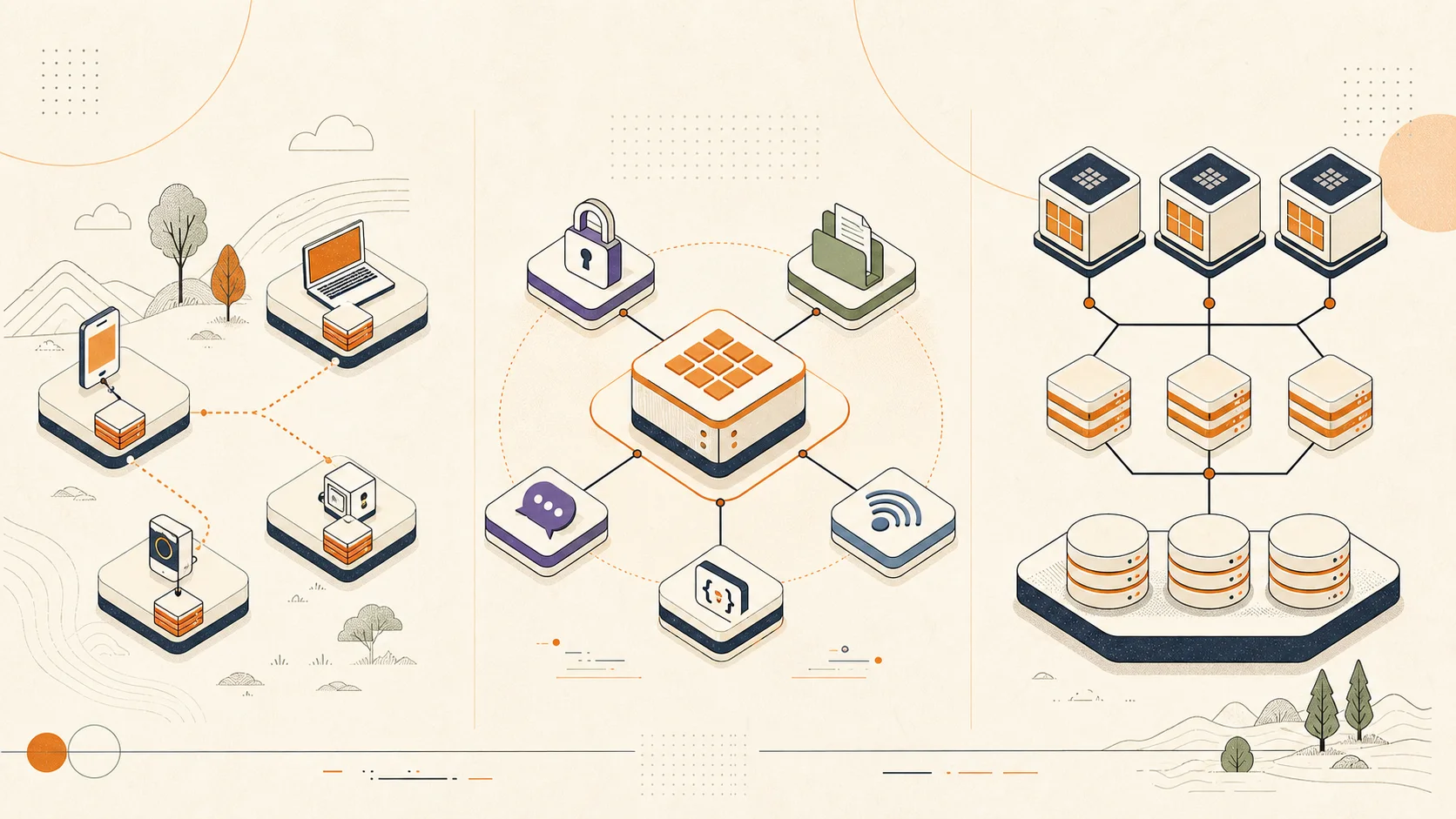
These products live at different layers
D1 is a serverless SQLite database tightly integrated with Workers Bindings. Supabase is a BaaS built around full PostgreSQL plus Auth, Storage, Realtime, APIs, and other services. Neon is serverless Postgres with separated compute and storage, autoscaling, and database branching. Choose the application abstraction before comparing quotas.
Three runtime models
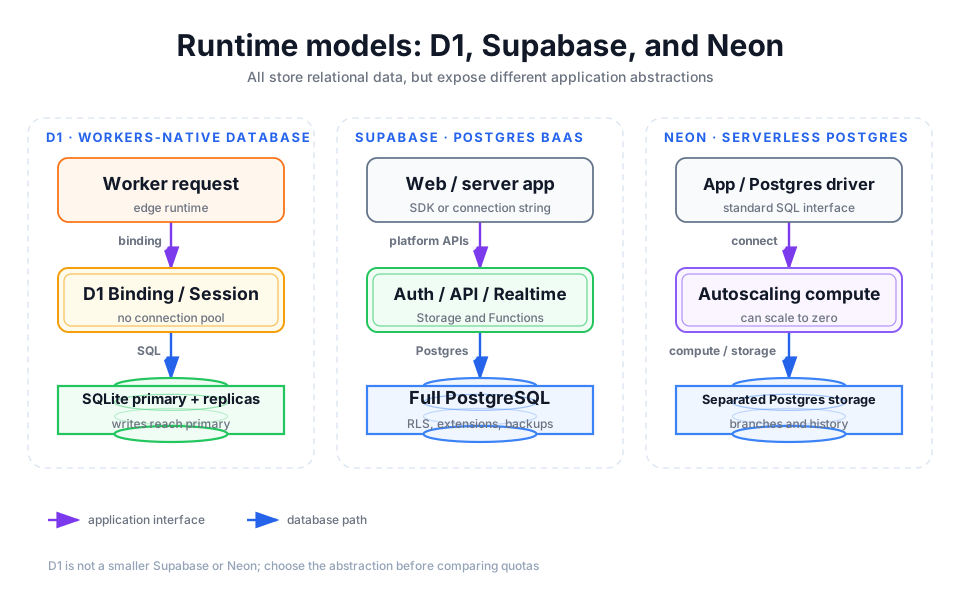
Detailed description
- 01D1
The app targets a Binding and SQLite, dropping pool management while accepting per-database and write-model boundaries.
- 02Supabase
The database anchors a larger platform that can include Auth, Storage, Realtime, and generated APIs.
- 03Neon
The app retains a standard Postgres interface while gaining autoscaling, scale-to-zero, and branches.
| Dimension | Cloudflare D1 | Supabase | Neon |
|---|---|---|---|
| Database engine | SQLite semantics, managed by Cloudflare | Full PostgreSQL | Full PostgreSQL with separated compute and storage |
| Application interface | Workers Binding, Sessions API, HTTP API/tooling | SDKs, generated REST/GraphQL capabilities, standard connection strings | Standard Postgres connections, serverless driver, common ORMs |
| Platform scope | Database composed with Workers, Queues, R2, and other bindings | Database plus Auth, Storage, Realtime, Functions, and a broader BaaS | Serverless Postgres, branching, autoscaling, and database development workflow |
| Scaling model | Queries execute serially per database; split by tenant or boundary | Dedicated compute per project, scaled by plan and instance resources | Autoscaling compute can idle to zero while storage grows separately |
| Global reads | Read Replication requires the Sessions API; writes still reach the primary | Depends on project region and available read-replica features | Depends on regions and read-replica/compute configuration |
| Capacity boundary | Paid hard limit of 10 GB per database; designed for many databases when appropriate | Project compute, disk, and plan support a larger single Postgres database | Compute, storage, and plan support a larger single Postgres database |
| Strength | Workers-native, no connection pool, row/storage billing, tenant sharding | Integrated backend, RLS, extensions, realtime, auth, and storage | Standard Postgres compatibility, branching, previews, elastic compute |
| Main tradeoff | SQLite/Postgres differences, hard per-DB limit, serial hot-write paths | Larger platform surface; compute, disk, egress, and features shape the bill | Correct connection, region, wake-up, and CU-hour design still matters |
D1 limits shape the data model
According to D1 Limits, a Free database is capped at 500 MB and a Paid database has a hard 10 GB limit. A single database executes queries sequentially. This fits a tenant, site, workspace, or project-per-database architecture; it is a poor excuse to force a continuously growing analytics warehouse into one database.
D1 Read Replication creates global read replicas, but the application must use the Sessions API and bookmarks for sequential consistency. Writes still return to the primary. It is not multi-primary and does not remove contention on a hot row or database.
D1 follows SQLite conventions and supports the documented extensions. Before moving a Postgres application, inspect types, extensions, functions, concurrent transactions, and ORM-generated SQL—not just a simple SELECT.
Billing units are not interchangeable
| Platform | Billing shape | How to interpret included usage |
|---|---|---|
| D1 | Rows read, rows written, and storage; no D1 egress charge, while Workers is billed separately | Free includes 5 million rows read and 100,000 rows written per day plus 5 GB total; Paid includes 25 billion reads, 50 million writes, and 5 GB monthly before overage |
| Supabase | Organization plan plus dedicated compute per project, then disk, egress, and feature usage | It is a full backend-platform bill, not just database capacity; calculate from current Supabase Billing organization and project units |
| Neon | CU-hours, storage, history, and additional capabilities | Free, Launch, and Scale include different compute and storage; reprice from Neon Pricing with the actual active/idle curve |
At the verification date, D1 Paid overage lists $0.001 per million rows read, $1 per million rows written, and $0.75/GB-month. Neon's public page lists Launch compute at $0.106/CU-hour and storage at $0.35/GB-month. The units are fundamentally different: scanned/written rows versus Postgres compute time and storage. The smaller number does not declare a winner.
Rows read are not API requests
One unindexed query can scan many rows, so a D1 model must record rows_read, not only HTTP requests. Conversely, Postgres connections, active compute, instance size, disk, and egress cannot honestly be compressed into a fake “cost per request.”
Choose by application boundary, not popularity
D1 is a stronger fit when
- A Workers-native SaaS, CMS, or small API can isolate each tenant or site in its own database.
- Relational data is bounded and the team wants a Binding instead of pools and public database credentials.
- Reads dominate, indexes are explicit, and writes can reach one primary.
- D1 metadata composes with R2 files, Queue jobs, and Durable Objects coordination.
Supabase is a stronger fit when
- The team needs Auth, Storage, Realtime, RLS, and generated APIs around the database and accepts an integrated platform.
- The application depends on Postgres extensions, complex SQL, triggers, or database authorization.
- An AI-generated SaaS or CMS frontend needs mature backend capabilities quickly, while the team will still review RLS and key boundaries.
Neon is a stronger fit when
- Standard PostgreSQL, ORM, and driver compatibility are mandatory, with autoscaling or scale-to-zero compute.
- Every pull request or preview needs a database branch, or test-data workflow is a major bottleneck.
- The database is the main boundary and an integrated BaaS abstraction is not required.
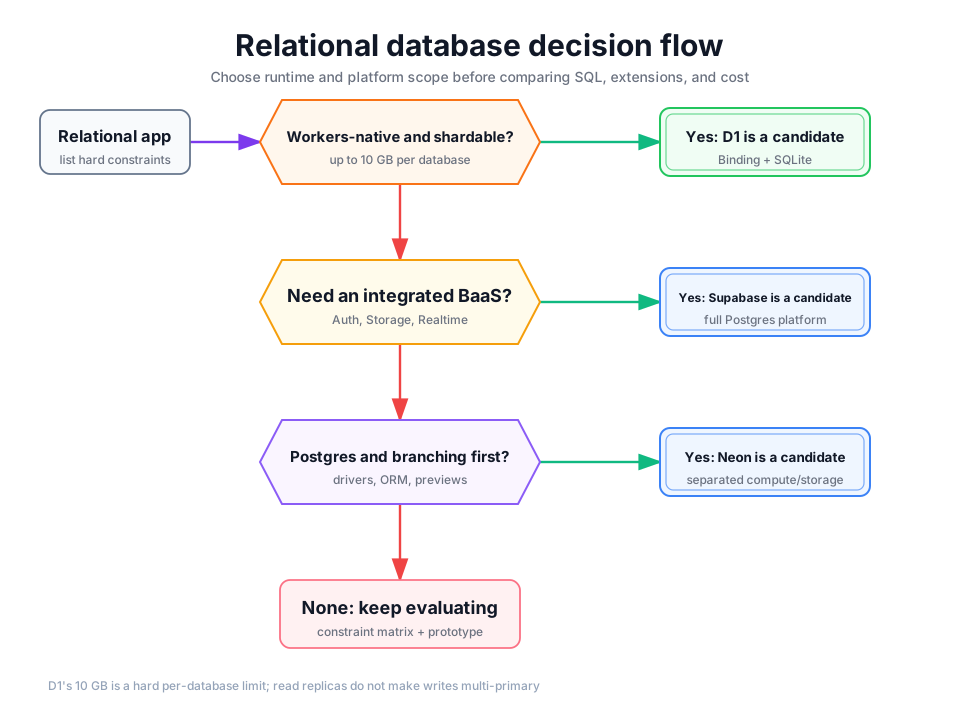
Detailed description
Constraints matter more than asking AI to “pick a database”
For the internal Cloudflare storage boundary, read KV, D1, R2, and Durable Objects. After selecting D1, use the migration, local verification, and Time Travel release guide. Runnable examples include Workers + D1 API, multi-tenant SaaS, and content CMS.
Official and vendor sources
Did this page help you complete your goal?
Beta feedback is generated in this browser and is never uploaded automatically.
R2 vs S3, OSS, and B2: choosing cost-efficient object storage
Compare R2, Amazon S3, Alibaba Cloud OSS, and Backblaze B2 across storage, requests, public egress, ecosystem, and region—and learn when R2 is cost-efficient.
Technology guide network for runtimes, frameworks, and data
Continue from Cloudflare platform boundaries into Bun, Deno, TanStack, PostgreSQL, MariaDB, and Valkey, then return to an Orange Book implementation path.