
Project three a Workers AI and Vectorize knowledge assistant
Build minimum RAG with multilingual embeddings, traceable metadata, protected ingestion, and an explicit no-context branch.
Edited and verified by Orange Book Editorial Team ·
Done means
/index and /ask require separate secrets and Vectorize metadata traces to source text; queries pass only embedding.data[0], while no matches return 404 no_context instead of inviting unsupported generation.
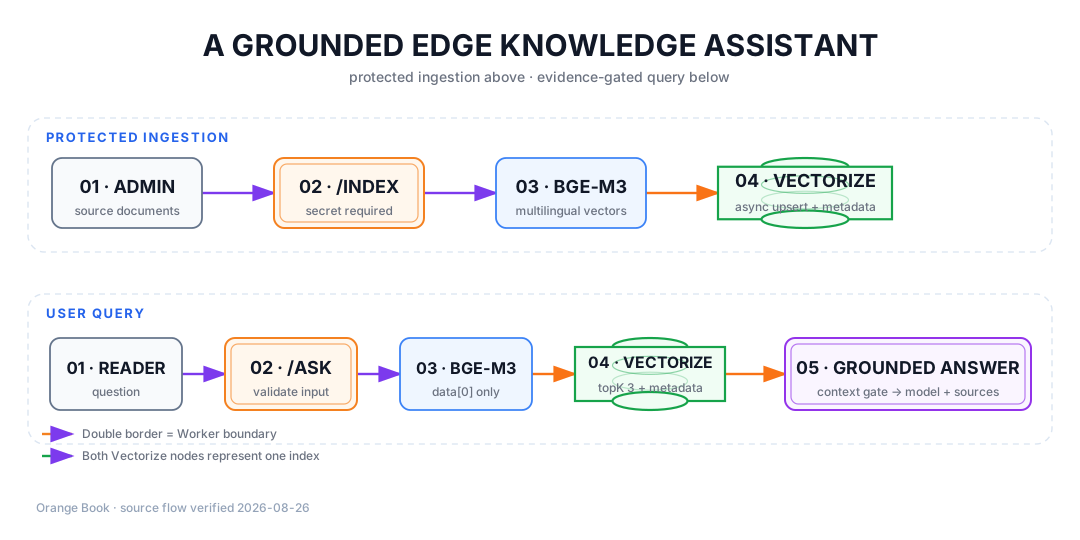
Detailed description
- 01Ingest
A secret-protected document endpoint.
- 02Embed
bge-m3 produces multilingual embeddings.
- 03Retrieve
Vectorize returns source-text metadata.
- 04Answer
Generation runs only with matched context.
Files and resources
Runnable source lives in examples/ai-knowledge-assistant/. INGEST_KEY and QUERY_KEY are secrets and must not be vars values.
Prepare and verify
Create the multilingual vector index
pnpm wrangler vectorize create orange-book-knowledge --preset @cf/baai/bge-m3This creates a remote resource and requires account authorization; confirm the target account first. --preset lets Wrangler derive dimensions and metric from the current embedding model.
Set the secret and start
cp examples/ai-knowledge-assistant/.dev.vars.example examples/ai-knowledge-assistant/.dev.vars
pnpm wrangler dev --config examples/ai-knowledge-assistant/wrangler.jsonc
Replace both placeholders in .dev.vars and never commit that file. Workers AI and Vectorize use remote service quota and are not a fully offline preview; set production secrets separately only after confirming the target account.
Index one document
curl -i http://127.0.0.1:8787/index \
  -H 'content-type: application/json' \
  -H 'x-ingest-key: <your-local-secret>' \
  --data '{"documents":[{"id":"tls-strict","text":"Prefer Full strict for a new site.","source":"/en/docs/fundamentals/tls-modes"}]}'
After 202 indexing, wait a few seconds before querying because Vectorize upsert becomes visible asynchronously.
Ask and inspect sources
curl -i http://127.0.0.1:8787/ask \
  -H 'content-type: application/json' \
  -H 'x-query-key: <your-local-query-secret>' \
  --data '{"question":"Which TLS mode should a new site use?"}'
Confirm sources came from indexed metadata. With no indexed match, expect no_context, not a fabricated answer.
Rollback and security boundary
- Remove public routing or roll back the Worker version first; back up or rebuild index data separately.
- Rotate a leaked
INGEST_KEYorQUERY_KEY; deleting code is insufficient. QUERY_KEYis only a server-to-server tutorial guard and must not be embedded in a browser; a public UI also needs user authentication, abuse protection, and cost limits.- Model names are time-sensitive configuration. Recheck the model catalog, pricing, and data policy before release.
- Retrieved content enters the prompt as untrusted reference data. This example returns text and never executes model- or document-proposed actions.
Primary sources
Did this page help you complete your goal?
Beta feedback is generated in this browser and is never uploaded automatically.
Project two a Workers and D1 notes API
Build a reviewable CRUD API with migrations, bound SQL parameters, structured errors, and local D1.
Project eight, a navigation site
Render a link directory with one Worker, store links in KV, cache the page with the Cache API, and purge that cache after authenticated writes.